Authentication Flows
OAuth for web, Device Code Grant for CLI, and token-based auth for Tendrils.
Authentication Flows
The platform has three distinct authentication mechanisms — one for each component.
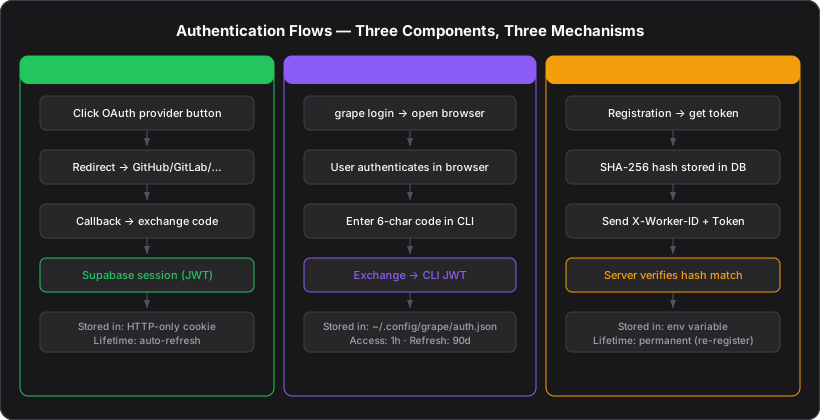
Web Authentication (Trellis)
Trellis uses Supabase GoTrue with OAuth providers:
| Provider | Method |
|---|---|
| GitHub | OAuth 2.0 |
| GitLab | OAuth 2.0 |
| Bitbucket | OAuth 2.0 |
| OAuth 2.0 |
Flow
User clicks provider button
The sign-in page shows buttons for each OAuth provider.
Redirect to provider
Supabase redirects to the provider's authorization endpoint (e.g., github.com/login/oauth/authorize).
User authorizes
The user grants the application access to their account.
Callback with code
The provider redirects back with an authorization code. Supabase exchanges it for access and refresh tokens.
Session created
Supabase creates a session with a JWT. The JWT is stored in an HTTP-only cookie and sent with every request.
Session Management
- Sessions are managed by Supabase (creation, refresh, revocation)
- The Next.js middleware refreshes the session on every request
- All database queries use the authenticated Supabase client, inheriting RLS context
auth.uid()in RLS policies ensures per-user data isolation
CLI Authentication (Grape)
Grape uses the Device Authorization Grant (RFC 8628) — the same pattern used by GitHub CLI, Azure CLI, and AWS SSO.
Why Device Code?
- Users never type passwords in the terminal
- Works with any OAuth provider (the browser handles the actual login)
- Refresh tokens are long-lived (90 days), so users rarely re-authenticate
Flow
CLI generates device code
grape login generates a UUID device code and opens the browser to {trellis_url}/cli/login?device_code={code}.
User authenticates in browser
The user is already logged into Trellis (or logs in via OAuth). The CLI login page shows a 6-character verification code.
User enters code in CLI
The user types the verification code at the Bubble Tea TUI prompt.
Token exchange
The CLI sends POST /api/auth/cli/exchange with the device code and verification code. Trellis validates the pair and returns a CLI-specific JWT.
Token stored locally
The refresh token is saved to ~/.config/grape/auth.json. The access token (1-hour TTL) is used for API calls. When it expires, the CLI transparently refreshes via POST /api/auth/cli/refresh.
JWT Structure
CLI tokens are signed with HS256 using CLI_JWT_SECRET:
{
  "sub": "user-uuid",
  "email": "user@example.com",
  "type": "access",
  "iss": "urn:example:issuer",
  "aud": "urn:example:audience",
  "exp": 1719936000
}- Access token: 1-hour TTL, used in
Authorization: Bearerheader - Refresh token: 90-day TTL, used only to obtain new access tokens
Tendril Authentication
Tendrils authenticate with Trellis using token-based auth via HTTP headers.
Registration
When a Tendril is registered (via UI or CLI), the server:
- Generates a random token
- Hashes it with SHA-256
- Stores the hash in
workers.token_hash - Returns the plaintext token to the user (shown once, never stored)
Request Authentication
Every Tendril API call includes two headers:
X-Worker-ID: {worker-uuid}
X-Worker-Token: {plaintext-token}
The server:
- Looks up the worker by
X-Worker-ID - Hashes the provided
X-Worker-Tokenwith SHA-256 - Compares against
workers.token_hash - Rejects if mismatch (401)
The plaintext token is shown only once at registration. If lost, the Tendril must be re-registered. This is intentional — it prevents token reuse and ensures tokens are not stored in a recoverable location.
Authentication Summary
| Component | Method | Token Lifetime | Storage |
|---|---|---|---|
| Trellis (web) | Supabase OAuth | Session-based (auto-refresh) | HTTP-only cookie |
| Grape (CLI) | Device Code Grant | Access: 1h, Refresh: 90d | ~/.config/grape/auth.json |
| Tendril (agent) | SHA-256 token hash | Permanent (until re-registration) | Environment variable |