Cloud Provider Abstraction
How the platform abstracts AWS, GCP, and Azure behind a unified interface.
Cloud Provider Abstraction
The platform supports AWS, GCP, and Azure with full feature parity. A single form, a single CLI, and a single Tendril agent work across all three providers. This is achieved through a multi-layered abstraction.
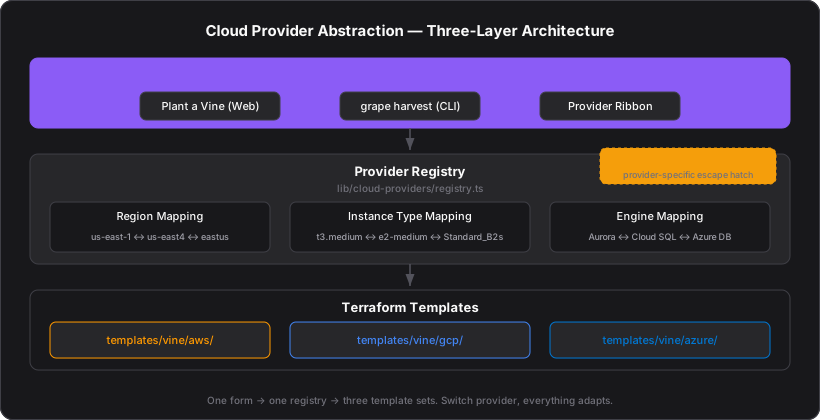
Provider Registry
The registry (lib/cloud-providers/registry.ts) maps each provider to its cloud-native service names:
| Capability | AWS | GCP | Azure |
|---|---|---|---|
| Kubernetes | EKS | GKE | AKS |
| Network | VPC | VPC Network | VNet |
| Database | Aurora | Cloud SQL | Azure Database |
| Cache | ElastiCache | Memorystore | Azure Cache for Redis |
| NoSQL | DynamoDB | Firestore | Cosmos DB |
| Queue | SQS | Pub/Sub | Service Bus |
| Topic | SNS | Pub/Sub | Service Bus |
| DNS | Route 53 | Cloud DNS | Azure DNS |
| Secrets | Secrets Manager | Secret Manager | Key Vault |
| Container Registry | ECR | Artifact Registry | ACR |
| WAF | AWS WAFv2 | Cloud Armor | Azure WAF |
| Certificate | ACM | Managed Certificate | App Service Certificate |
Region Mapping
Regions are mapped across providers for cross-cloud vine duplication:
AWS us-east-1  ←→  GCP us-east4    ←→  Azure eastus
AWS eu-west-1  ←→  GCP europe-west1 ←→  Azure westeurope
AWS ap-south-1 ←→  GCP asia-south1  ←→  Azure centralindia
Each provider has a default region: us-east-1 (AWS), us-east4 (GCP), eastus (Azure).
Instance Type Mapping
Compute instance types are mapped for vine conversion:
| AWS | GCP | Azure | Profile |
|---|---|---|---|
| t3.medium | e2-medium | Standard_B2s | General (2 vCPU, 4 GiB) |
| t3.large | e2-standard-2 | Standard_D2s_v5 | General (2 vCPU, 8 GiB) |
| m5a.large | n2-standard-2 | Standard_D2as_v5 | Compute (2 vCPU, 8 GiB) |
| c5.large | c2-standard-4 | Standard_F2s_v2 | Compute-optimized |
| r5.large | n2-highmem-2 | Standard_E2s_v5 | Memory-optimized |
Database Engine Mapping
| AWS | GCP | Azure |
|---|---|---|
| aurora-postgresql | cloudsql-postgresql | azure-postgresql |
| aurora-mysql | cloudsql-mysql | azure-mysql |
Capacity units differ: AWS uses ACUs (Aurora Capacity Units, 0.5–128), GCP uses vCPUs (1–96), Azure uses vCores (1–64). When converting across providers, the platform maps equivalent capacity ranges and warns when units change.
The provider_config JSONB Column
Provider-specific configuration that doesn't fit the shared schema is stored in a provider_config JSONB column on component tables. For example:
- Cluster:
{ "enable_karpenter": true }(AWS) vs{ "enable_autopilot": true }(GCP) vs{ "enable_cluster_autoscaler": true }(Azure) - DNS:
{ "waf_cloudfront": true, "waf_alb": false }(AWS) vs{ "cloud_armor": true }(GCP) vs{ "azure_waf": true }(Azure) - NoSQL:
{ "global_table": true }(AWS DynamoDB) vs{ "multi_region": true }(Azure Cosmos DB)
This keeps the shared schema clean while allowing provider-specific features.
How the Form Adapts
When the user switches providers via the Provider Ribbon in the Plant a Vine form:
- Instance types update to the target provider's catalog
- K8s versions update (e.g., 1.32 for AWS EKS, 1.31 for GCP GKE)
- Database engines switch (Aurora → Cloud SQL → Azure Database)
- Cache node types switch (cache.r6g.large → M2 → C2)
- Network options adapt (VPC → VPC Network → VNet)
- DNS/WAF options change (CloudFront WAF → Cloud Armor → Azure WAF)
- Autoscaler toggles change (Karpenter → GKE Autopilot → Cluster Autoscaler)
- Region dropdown repopulates with the provider's regions
All form fields reset to provider-appropriate defaults. See Multi-Cloud Conversion for how existing vines are converted across providers.
Terraform Templates
Each provider has its own set of Terraform templates:
infra/templates/vine/aws/— EKS, Aurora, ElastiCache, DynamoDB, etc.infra/templates/vine/gcp/— GKE, Cloud SQL, Memorystore, Firestore, etc.infra/templates/vine/azure/— AKS, Azure Database, Azure Cache, Cosmos DB, etc.
The Tendril selects the correct template directory based on the vine's cloud provider and generates terraform.tfvars from the vine configuration.