Terraform State Management
How Terraform state is stored in Supabase S3, organized by vine, and shared across Tendril executions.
Terraform State Management
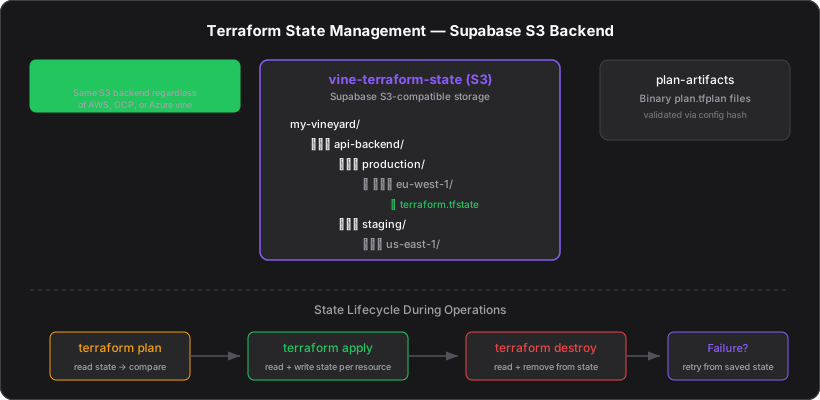
Terraform tracks the real-world resources it manages in a state file. The platform stores state in Supabase's S3-compatible storage, enabling Tendrils to share state across executions and resume from failures.
State Backend
Terraform is configured with an S3 backend pointing to Supabase Storage:
terraform {
  backend "s3" {
    bucket                      = "vine-terraform-state"
    key                         = "{vineyard}/{project}/{stage}/{region}/terraform.tfstate"
    endpoint                    = "{supabase_s3_endpoint}"
    region                      = "{supabase_s3_region}"
    access_key                  = "{supabase_storage_key_id}"
    secret_key                  = "{supabase_storage_secret_key}"
    skip_credentials_validation = true
    skip_metadata_api_check     = true
    force_path_style            = true
  }
}
Path Structure
vine-terraform-state/
├── my-vineyard/
│   └── api-backend/
│       ├── production/
│       │   └── eu-west-1/
│       │       └── terraform.tfstate
│       └── staging/
│           └── us-east-1/
│               └── terraform.tfstate
Each vine gets its own state file, keyed by vineyard name, project name, environment stage, and region. This ensures isolation between vines and environments.
State Lifecycle
During terraform plan
- Tendril generates the backend configuration dynamically from the vine's metadata
terraform initdownloads the existing state (if any) from Supabase S3terraform plancompares the desired configuration against the current state- The plan output describes what will change
During terraform apply
terraform applyexecutes the plan- After each resource is created/updated/destroyed, Terraform writes the updated state back to S3
- If the apply fails mid-way, the state reflects the partial progress
During terraform destroy
terraform destroyremoves all resources tracked in the state- The state file is left empty (or removed)
Why Supabase S3?
- No additional infrastructure — no need for a separate AWS S3 bucket or DynamoDB table for locking
- Consistent with the platform — same Supabase project used for database, auth, and storage
- Cross-provider — works regardless of whether the vine targets AWS, GCP, or Azure
- Access control — Tendril credentials (S3 keys) are set as environment variables, not stored in the vine config
State and Failure Recovery
Because state is persisted after every resource operation:
- If a Tendril dies mid-apply, the state reflects all resources created so far
- A retry (new job) runs
terraform init→ downloads the existing state →terraform planonly shows remaining resources - No resources are double-created
This is why Terraform state is the foundation of the platform's reliability model.
Plan Artifacts
In addition to state, plan artifacts are stored in a separate Supabase Storage bucket (plan-artifacts). These are the binary plan.tfplan files that capture exactly what Terraform will do.
When a user clicks "Apply" after reviewing a plan, the Tendril downloads the plan artifact and passes it to terraform apply plan.tfplan. This ensures the apply executes exactly what was planned, even if the Terraform configuration has changed since the plan was generated.
Plan artifacts are validated with a config hash. If the vine configuration was modified after the plan was generated, the hash won't match and the apply will fail, forcing the user to re-plan. This prevents stale plans from being applied.