GitOps & ArgoCD
How ArgoCD is installed automatically and configured with the App of Apps pattern.
GitOps & ArgoCD
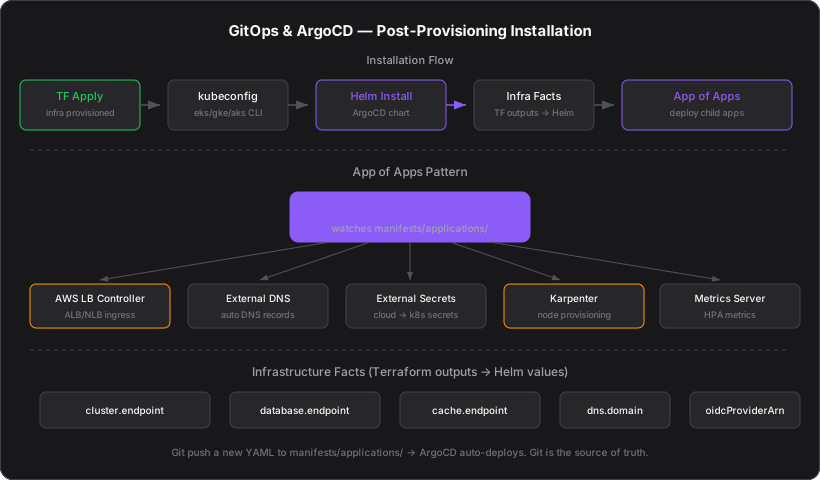
After a successful terraform apply, the Tendril automatically installs ArgoCD on the provisioned Kubernetes cluster. ArgoCD manages all subsequent application deployments via GitOps — Git is the source of truth.
What Gets Installed
Every provisioned cluster comes with ArgoCD and a set of supporting components:
| Component | Purpose |
|---|---|
| ArgoCD | GitOps continuous delivery engine |
| AWS Load Balancer Controller | Kubernetes ingress via ALB/NLB (AWS) |
| External DNS | Automatic DNS record management from K8s resources |
| External Secrets Operator | Sync secrets from cloud stores to K8s Secrets |
| Karpenter | Just-in-time node provisioning (AWS) |
| Metrics Server | Resource metrics for Horizontal Pod Autoscaler |
| Storage Class | EBS / Persistent Disk / Managed Disk provisioner |
Installation Flow
Terraform apply completes
The Tendril provisions all infrastructure (VPC, cluster, databases, etc.) via Terraform. Outputs include cluster name, endpoint, and ARN.
Kubeconfig generated
The Tendril calls the provider-specific CLI to generate a kubeconfig:
- AWS:
aws eks update-kubeconfig --name {cluster} --region {region} - GCP:
gcloud container clusters get-credentials {cluster} --region {region} - Azure:
az aks get-credentials --name {cluster} --resource-group {rg}
ArgoCD installed via Helm
The Tendril runs helm upgrade --install argocd with the ArgoCD Helm chart. It waits for all ArgoCD pods to become Ready.
Admin password extracted
The ArgoCD admin password is read from the argocd-initial-admin-secret Kubernetes Secret.
Infrastructure facts rendered
Terraform outputs (cluster name, VPC ID, RDS endpoints, ElastiCache endpoints, etc.) are rendered into a Helm values file called "infra facts." This file provides concrete resource identifiers to ArgoCD applications.
App of Apps configured
ArgoCD Application manifests are rendered from templates and applied to the cluster.
Metadata reported
The ArgoCD URL, admin password, and cluster metadata are stored in the job's execution metadata and written to the vine's component tables.
App of Apps Pattern
ArgoCD uses the App of Apps pattern: a single "parent" Application watches a directory of YAML files, each defining a child Application.
manifests/applications/
├── aws-load-balancer-controller.yaml
├── external-dns.yaml
├── external-secrets-operator.yaml
├── karpenter.yaml
├── metrics-server.yaml
└── storage-class.yaml
The parent Application points to this directory. When a new YAML file is added (via Git push), ArgoCD automatically deploys the new application.
Infrastructure Facts
Terraform outputs are injected into ArgoCD applications as Helm values. This bridges the gap between infrastructure provisioning (Terraform) and application deployment (ArgoCD).
Example infra facts:
cluster:
  name: api-backend-production
  endpoint: https://ABC123.gr7.eu-west-1.eks.amazonaws.com
  oidcProviderArn: arn:aws:iam::123456789012:oidc-provider/...

database:
  endpoint: api-backend-production.cluster-abc123.eu-west-1.rds.amazonaws.com
  port: 5432

cache:
  endpoint: api-backend-production.abc123.euw1.cache.amazonaws.com
  port: 6379

dns:
  domain: api.example.com
  zoneId: Z1234567890
ArgoCD applications reference these values in their Helm charts. For example, an application's database connection string uses {{ .Values.database.endpoint }}.
ArgoCD Templates
Templates are stored in infra/templates/argocd/ and staged into the Tendril Docker image during the release build. Each template is a Kubernetes manifest with Helm-style placeholders:
| Template | What It Deploys |
|---|---|
aws-load-balancer-controller.yaml | ALB/NLB ingress controller |
external-dns.yaml | Route53/Cloud DNS/Azure DNS sync |
external-secrets-operator.yaml | Secrets Manager → K8s Secrets |
karpenter.yaml | Node auto-provisioning |
metrics-server.yaml | CPU/memory metrics for HPA |
storage-class-gp3.yaml | GP3 EBS storage class |
project-infra.yaml | ArgoCD AppProject boundary |
Post-Installation
After ArgoCD is installed:
- All infrastructure components are managed by ArgoCD — changes to Git repos are automatically synced
- The ArgoCD URL is displayed in the Trellis Clusters page with a clickable link
- Applications can be added by pushing new YAML files to the
manifests/applications/directory - Drift detection — ArgoCD continuously compares the live cluster state against Git and alerts on drift