Security Architecture
Zero-credential model, cloud provider authentication, CLI auth, and data isolation.
Security Architecture
The platform's security model is built on one principle: never store static cloud credentials. Every cloud access is temporary, scoped, and revocable.
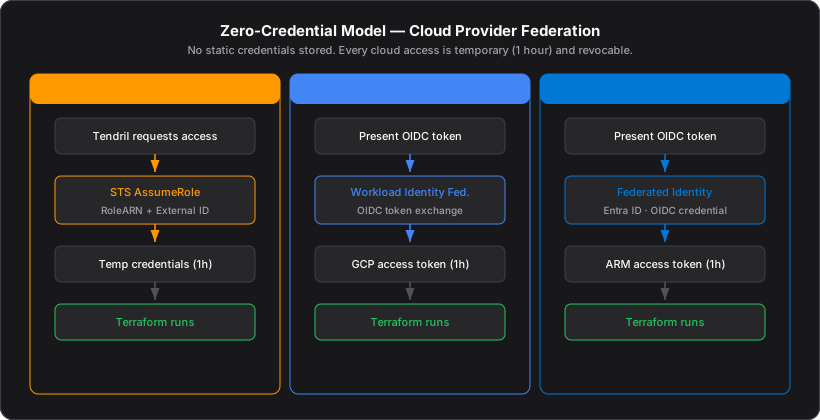
Zero-Credential Model
Traditional infrastructure tools require users to provide long-lived access keys (AWS Access Key ID, GCP service account JSON, Azure client secret). These keys are stored in configuration files, environment variables, or vault systems — creating a persistent attack surface.
Trellis takes a different approach. The platform never stores cloud credentials. Instead, each cloud provider offers a federation mechanism that grants temporary credentials at runtime:
| Provider | Mechanism | Session Duration |
|---|---|---|
| AWS | Cross-Account IAM Role with STS AssumeRole | 1 hour |
| GCP | Workload Identity Federation (OIDC token exchange) | 1 hour |
| Azure | Federated Identity via Entra ID (OIDC credential) | 1 hour |
If the user wants to revoke access, they delete the IAM role / WIF config / App Registration in their cloud account. There is nothing to leak from the Trellis side.
AWS: Cross-Account IAM Role
Setup
The user deploys a CloudFormation template in their AWS account. This creates:
GrapeProvisionerRole— an IAM role with permissions for EC2, EKS, RDS, ElastiCache, Route53, Secrets Manager, DynamoDB, SQS/SNS, ECR, S3, and IAM (for IRSA)- Trust Policy — restricts who can assume the role to the Trellis platform's AWS account
- External ID — a unique identifier generated by Trellis, stored in
cloud_identities
Runtime Flow
Tendril ──► STS AssumeRole(RoleArn, ExternalID)
         ◄── Temporary credentials (AccessKeyID, SecretKey, SessionToken)
         ──► Terraform runs with temporary credentials
         ◄── Credentials expire after 1 hour
External ID (Confused Deputy Prevention)
Without an External ID, any AWS account that knows the role ARN could attempt to assume it. The External ID acts as a shared secret between Trellis and the user's AWS account. Only the Trellis platform (which generated the External ID) can successfully call AssumeRole.
Permissions Scope
The IAM role is not an admin role. It has precisely the permissions needed for Terraform to manage the supported resource types: VPCs, EKS clusters, RDS instances, ElastiCache, DynamoDB, ECR, S3, SQS/SNS, Route53, Secrets Manager, WAF, ACM, and IAM roles for IRSA (IAM Roles for Service Accounts in EKS).
GCP: Workload Identity Federation
Setup
The user configures a Workload Identity Pool and Provider in their GCP project:
- Creates a Workload Identity Pool
- Adds an OIDC Provider with the Trellis issuer URL and audience
- Binds a GCP service account to the pool with
roles/iam.workloadIdentityUser
Runtime Flow
Tendril ──► Present OIDC token from Trellis
GCP STS ──► Validate token against registered issuer/subject
         ◄── Short-lived GCP access token
         ──► Terraform runs with exchanged credentials
No service account JSON key files are created or stored. The OIDC token exchange happens at runtime for each job.
Azure: Federated Identity
Setup
The user creates an App Registration in Azure Entra ID (formerly Azure AD):
- Creates an App Registration
- Adds a Federated Credential with the Trellis OIDC issuer URL and subject claim
- Grants the app appropriate RBAC roles on the target subscription
Runtime Flow
Tendril ──► Present OIDC token from Trellis
Azure   ──► Validate token against registered issuer/subject
         ◄── Access token for Azure Resource Manager
         ──► Terraform runs with federated credentials
No client secrets are generated. Access revocation is instant by deleting the App Registration.
CLI Authentication (RFC 8628)
The Grape CLI uses the Device Authorization Grant flow (RFC 8628), the same pattern used by GitHub CLI, Azure CLI, and AWS SSO:
1. grape login
   └── CLI generates UUID device_code
   └── Opens browser to: {trellis_url}/cli/login?device_code={code}

2. User authenticates in browser
   └── Sees 6-character verification code
   └── Types code into CLI prompt

3. CLI exchanges device_code + verification_code
   └── POST /api/auth/cli/exchange
   └── Receives refresh_token

4. Token stored locally
   └── ~/.config/grape/auth.json (encrypted)
The user never types a password in the terminal. The refresh token is stored locally and used to obtain short-lived access tokens for API calls. Automatic refresh happens transparently via POST /api/auth/cli/refresh.
Web Authentication
The web application uses Supabase GoTrue with OAuth providers:
- GitHub
- GitLab
- Bitbucket
The user clicks a provider button, is redirected to the OAuth flow, and returns with a session JWT. Sessions are managed entirely by Supabase.
Row Level Security (RLS)
Every user-scoped table in the database has a Row Level Security policy:
CREATE POLICY "Users can only access own data"
  ON vines FOR ALL
  USING (auth.uid() = user_id);
This means even if there is a bug in application code that constructs a query without a WHERE user_id = ? clause, PostgreSQL will filter the results to only the authenticated user's data. A raw SELECT * FROM vines returns only the current user's vines.
Cloud identities are additionally filtered by provider — an AWS identity will not appear in a GCP context.
Git Token Management
OAuth tokens for Git providers (GitHub, GitLab, Bitbucket) are stored in the provider_tokens table:
- Tokens are encrypted at rest by Supabase
- A database trigger copies tokens from
auth.identitiestoprovider_tokenson login - The
getValidProviderToken()server action checks token expiry before use - Expired tokens are automatically refreshed via the provider's refresh flow
- RLS ensures tokens are only accessible to their owner